



Create several sweater sizes
If you want to order several sizes with the same design you can either scale the design or cut the smaller sizes out. Both methods are explained here.
For graphic designs we recommend to use the scale method. For pixelperfect designs it´s better to cut the sizes out.
Scale design
You can scale the design on your desired sizes directly in the online-designer. Use the "share design" link to create copies, then change the size on the left side in the online-designer.
Check all sizes before ordering. Make sure all elements are in place and well visible.Pixelperfect patterns and cliparts can become unclean

Cut design out
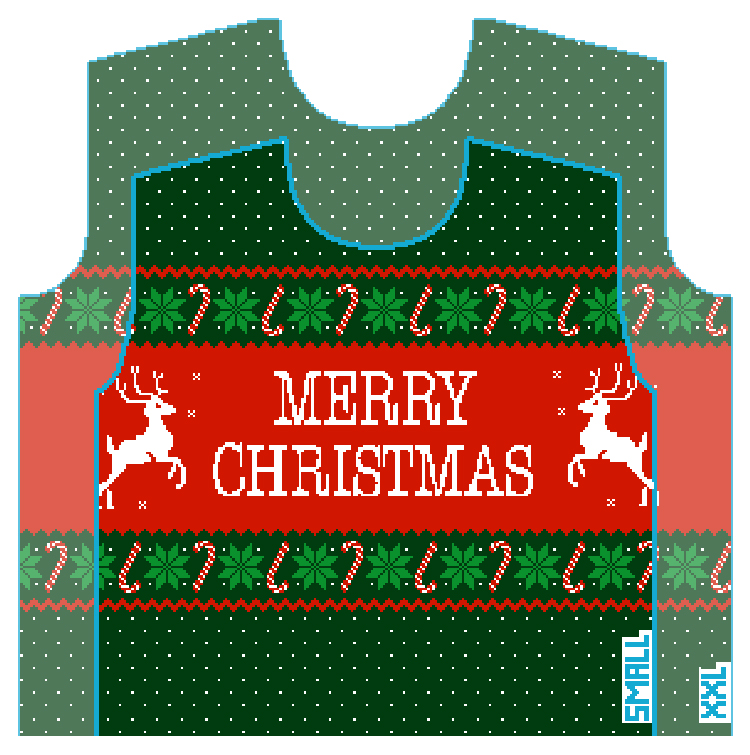
You can design the largest size you need. All smaller sizes then can get cut out of that.
Avoid important elements on the very top or sides. They might get cut off in the smaller sizes.
In the picture you see the sizes S and XXL. There you can see how much is cut off from the largest to the smallest size.
You can send us the largest size you designed, then we will cut out all your desired sizes.