




How to create a design offline
If you want to convert a design into a knittable file, or start from scratch and draw your design in Photoshop or Illustrator, see tipps and best practices for offline design below.
Check out the file format & file specs site of your desired product before starting to design.
Download template
Choose a product from the product overview and open it in the Online-Designer.

Choose a design with pattern, unicolor or already designed. Place all colors you want to use on your template (e.g. as cliparts or draw pixels with the pencil tool). If you are designing a sweater choose the correct size.

Click on „Share design“ and download the template. Open the downloaded file in Photoshop or Illustrator and save the colors on your template as a palette.
Photoshop: Design & correct
If you want to draw on the downloaded file or correct your design to be pixel-perfect, please notice following tips for choosing the right tools:

Brush & pencil
The brush tool (left) will smooth the edges which will cause color gradations. The design will not be color reduced anymore.
The pencil tool (right) draws pixel-perfect and the design will stay correctly color reduced.
Shapes
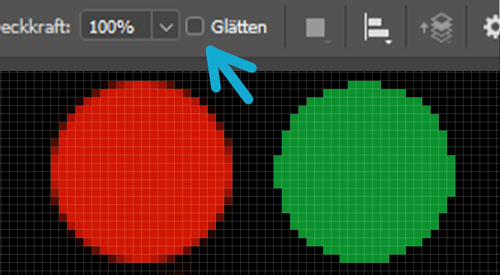
For the shape tool it´s important to deselect the option "smooth" in the upper setting bar so the edges will not cause color gradations.
On the left an example with the option "smooth" and on the right without.
Work with the colors you saved as pallette. This way you will have no problems with uploading the file when finished.
Photoshop: Convert design


If you want to convert a design or photo into a correctly color-reduced file please start with step 1. Open the downloaded file in photoshop and place your design. First you have to save the colors you chose from the online-designer as a pallette, then you can follow these steps:
 >
>
Click Image > Mode > Indexed Color

First click "Local (Adaptive) so you can choose the number of colors.
The max. number of colors you can use is written on the file format site of the desired product.

Now change the Palette to "Custom". Click on every color and replace it with your saved colors from the template. Then click OK.
You can click on the option "Dither" to see different options of your picture and find a style you like.
Illustrator
To design pixel perfect and color reduced in Illustrator change the following settings:

View > Pixel preview
Even if your file has the right pixel measurements Illustrator shows you the vector design. To see the single pixels you have to change the view to pixel preview.

Edit > Preferences > General > Anti-aliased Artwork
To work color reduced and avoid smoothed edges deselect the setting "Anti-aliased Artwork" in the general preferences.
We recommend to make your Illustrator design without small logos. It´s easier to add them in the online-designer later so you can change the settings there and edit single pixels easier.
Export / Save the design
Export your file as PNG-8. Check off any settings like "Type optimized" or "Anti-Aliasing". Choose the number of colors you used (for the football scarf you can use up to 5 colors, for the sweater up to 4).
Now you can upload your PNG-file in our online-designer. Choose the correct colors and make sure that the design is scaled to 100%. If the design is correct it should look exactly the same as when you designed it. If anything didn´t work or you have a question you can send us your design per mail.

File > Save as
